
Managing Policy Engines
A policy engine is the on-chain orchestrator that evaluates policies whenever a protected function is called. Each policy engine is deployed as a smart contract on one or more chains, and all your targets, policies, and protections are scoped to a specific engine. For a deeper explanation of how policy engines fit into the architecture, see Architecture and Policy Management.
Create a policy engine
- In the Chainlink Platform, go to Compliance > Policy Manager.
- Click Create a new engine.
- Complete the three-step wizard:
- Basic details — enter an engine name and optional description. This metadata is internal and is not written onchain.
- Networks — select every chain where you want this engine deployed. Only networks enabled in your CRE account appear. If you do not see a network, contact your admin to ensure it is enabled in your CRE account first. Deploy a CRE Connect Wallet on each selected chain before creating the engine.
- Contract types — select ERC-20 and/or ERC-3643. ACE attaches all pre-built extractors for the selected types automatically.
- Submit the wizard and wait for onchain deployment to complete. The engine starts in
creation_pendingstatus until deployment finishes. - Open the engine in Policy Manager and confirm its status is Active. Click the gear icon to view the onchain contract addresses and attached extractors.
For verification and troubleshooting during deployment, see Create a PolicyEngine in the Policy Manager Quick Start.
Create a policy engine with a POST request. Each entry in onchain_policy_engines specifies a chain_selector for a target chain (see Supported Networks for available chain selectors):
curl -X POST https://ace.api.chain.link/v1/policy-engines \
  -H "Content-Type: application/json" \
  -H "Authorization: Apikey <API_KEY>" \
  -d '{
    "name": "Production Policy Engine",
    "description": "Main policy engine for compliance enforcement",
    "onchain_policy_engines": [
      { "chain_selector": "16015286601757825753" },
      { "chain_selector": "3478487238524512106" },
      { "chain_selector": "14767482510784806043" },
      { "chain_selector": "16281711391670634445" },
      { "chain_selector": "10344971235874465080" }
    ]
  }'
| Field | Required | Description |
|---|---|---|
name | Yes | Human-readable name |
description | No | Description of the engine's purpose |
extractor_ids | No | Array of extractor UUIDs to register with the engine |
onchain_policy_engines | Yes | Array of objects with chain_selector values for each deployment chain |
Each on-chain engine starts in creation_pending status until deployment completes. The response includes the engine id and the on-chain contract addresses.
View policy engines
-
In the Chainlink Platform, go to Compliance > Policy Manager in the left sidebar. You see all the policy engines in your organization.
-
Click on a policy engine to open it. The detail view has two tabs:
- Contracts — lists the target contracts protected by this policy engine.
- Policy types — lists all policy instances created for this policy engine.
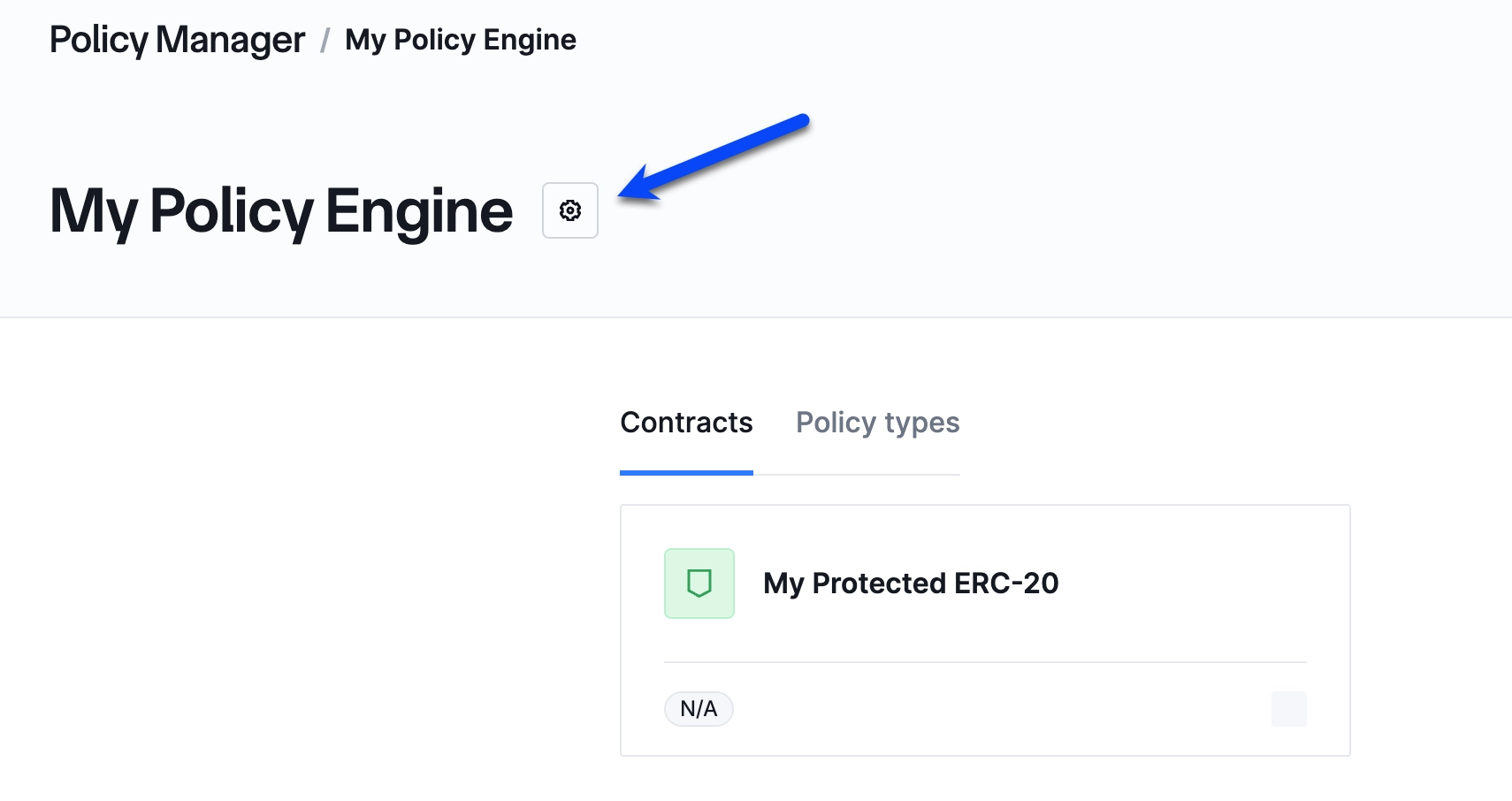
Policy engine detail view showing the Contracts and Policy types tabs.
-
To view the engine's on-chain details, click the gear icon (shown in the screenshot above) to open the settings page. There you can see:
- The PolicyEngine contract addresses on each network the engine is deployed to.
- The Extractors currently attached to this policy engine.
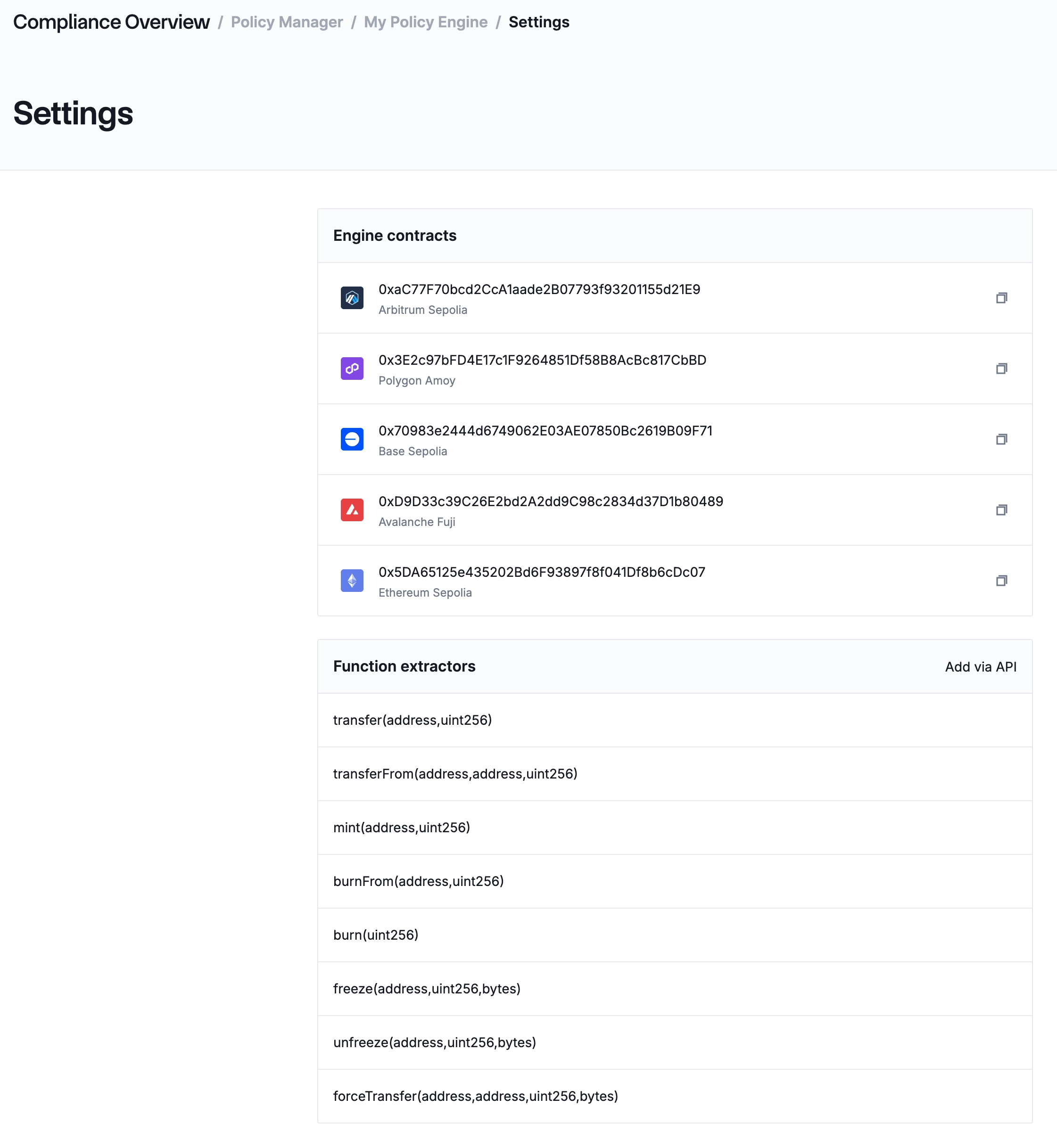
Policy engine settings showing contract addresses and attached extractors.
List all policy engines:
curl https://ace.api.chain.link/v1/policy-engines \
  -H "Authorization: Apikey <API_KEY>"
| Parameter | Description |
|---|---|
page | Page number (default: 1) |
page_size | Results per page (max: 100) |
include_onchains | Include on-chain deployment details (default: true) |
To retrieve a specific engine by ID:
curl https://ace.api.chain.link/v1/policy-engines/<POLICY_ENGINE_ID> \
  -H "Authorization: Apikey <API_KEY>"
Update a policy engine
You can update a policy engine's name, description, and extractor associations.
Update a policy engine with a PUT request. Both name and onchain_policy_engines are required:
curl -X PUT https://ace.api.chain.link/v1/policy-engines/<POLICY_ENGINE_ID> \
  -H "Content-Type: application/json" \
  -H "Authorization: Apikey <API_KEY>" \
  -d '{
    "name": "Production Policy Engine (Updated)",
    "description": "Updated description",
    "extractor_ids": ["<EXTRACTOR_ID>"],
    "onchain_policy_engines": [
      { "chain_selector": "16015286601757825753" },
      { "chain_selector": "3478487238524512106" },
      { "chain_selector": "14767482510784806043" },
      { "chain_selector": "16281711391670634445" },
      { "chain_selector": "10344971235874465080" }
    ]
  }'
Add or remove extractors
Extractors decode transaction calldata into named parameters (sender, recipient, amount, etc.) so policies can evaluate them. If you forgot to attach an extractor during engine creation or need to remove one, use the PUT /policy-engines/{id} endpoint.
Add a missing extractor
First, retrieve your engine to see which extractors are currently attached:
curl https://ace.api.chain.link/v1/policy-engines/<POLICY_ENGINE_ID> \
  -H "Authorization: Apikey <API_KEY>"
Check the extractor_registrations array in the response. Then send a PUT request that includes the existing extractor IDs plus the new one:
curl -X PUT https://ace.api.chain.link/v1/policy-engines/<POLICY_ENGINE_ID> \
  -H "Content-Type: application/json" \
  -H "Authorization: Apikey <API_KEY>" \
  -d '{
    "name": "My Policy Engine",
    "extractor_ids": [
      "d4b8cd51-7d5a-487a-9ba5-bb7236e3184c",
      "572201bb-170b-4fda-ab89-a65b5bbc594b",
      "f17bbe8b-8462-4dd7-8fb7-a4973dff04fc"
    ],
    "onchain_policy_engines": [
      { "chain_selector": "16015286601757825753" },
      { "chain_selector": "3478487238524512106" },
      { "chain_selector": "14767482510784806043" },
      { "chain_selector": "16281711391670634445" },
      { "chain_selector": "10344971235874465080" }
    ]
  }'
In this example, f17bbe8b-8462-4dd7-8fb7-a4973dff04fc is the new extractor being added alongside two that were already attached.
Remove an extractor
Send a PUT request with the extractor_ids array that omits the extractor you want to detach:
curl -X PUT https://ace.api.chain.link/v1/policy-engines/<POLICY_ENGINE_ID> \
  -H "Content-Type: application/json" \
  -H "Authorization: Apikey <API_KEY>" \
  -d '{
    "name": "My Policy Engine",
    "extractor_ids": [
      "d4b8cd51-7d5a-487a-9ba5-bb7236e3184c",
      "572201bb-170b-4fda-ab89-a65b5bbc594b"
    ],
    "onchain_policy_engines": [
      { "chain_selector": "16015286601757825753" },
      { "chain_selector": "3478487238524512106" },
      { "chain_selector": "14767482510784806043" },
      { "chain_selector": "16281711391670634445" },
      { "chain_selector": "10344971235874465080" }
    ]
  }'
Archive a policy engine
Archiving a policy engine deactivates it and prevents any further operations. All policy instances associated with the engine must be archived first.
Archive a policy engine with a PATCH request:
curl -X PATCH https://ace.api.chain.link/v1/policy-engines/<POLICY_ENGINE_ID> \
  -H "Content-Type: application/json" \
  -H "Authorization: Apikey <API_KEY>" \
  -d '{
    "status": "archived"
  }'
Related pages
- Architecture — how PolicyEngine contracts fit into the ACE system
- Policy Management — how policy chains and evaluation work
- Managing Targets — register contracts to protect under an engine
- Managing Policies — create and configure policy instances
- Coordinator API Reference — full API schema